
Skip to content

Cannapopolis OS

Live

AI agents behind a Shopify store: orders, stock, content, ads, B2B, finance and invoices in one chat, in Bulgarian.

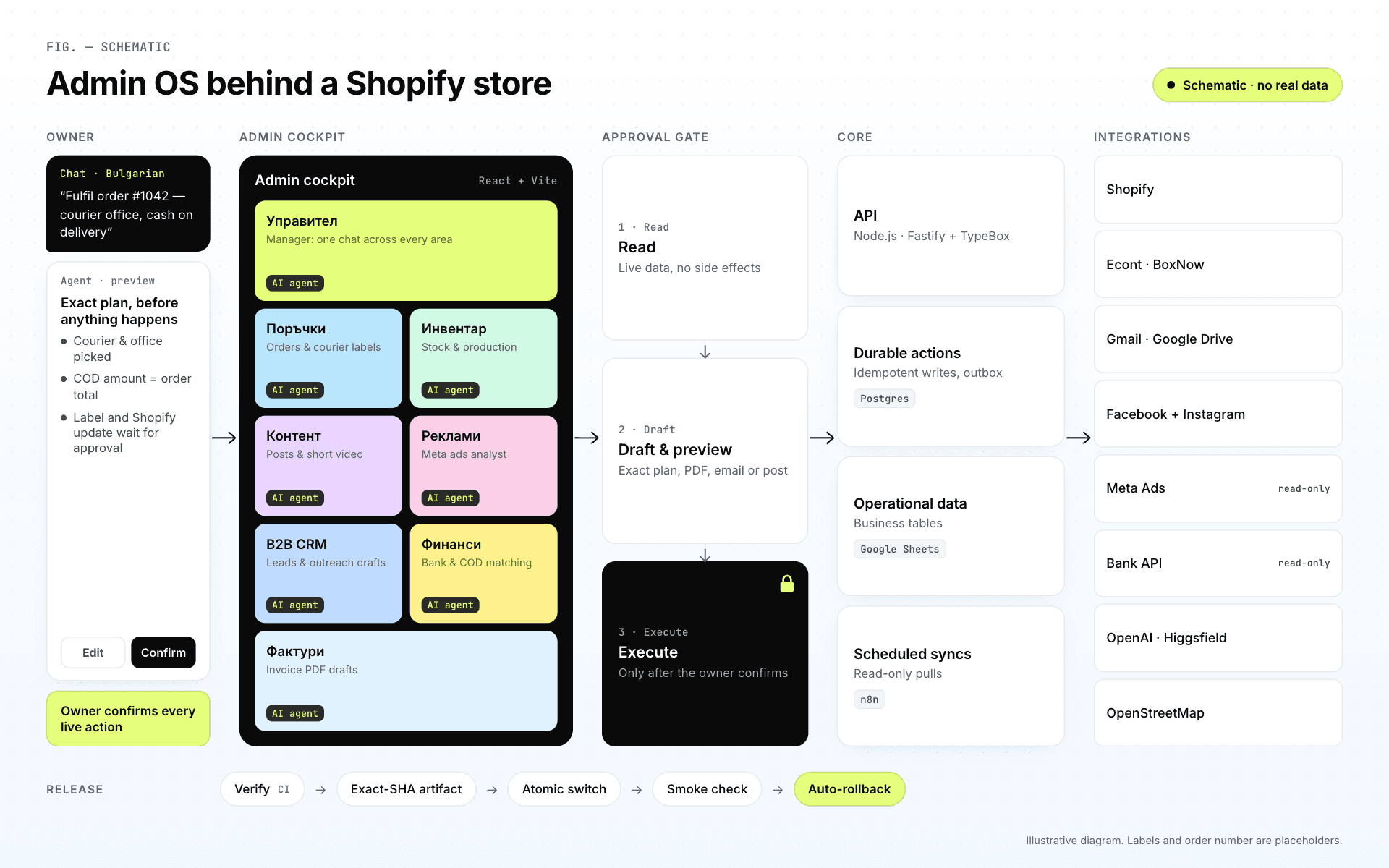
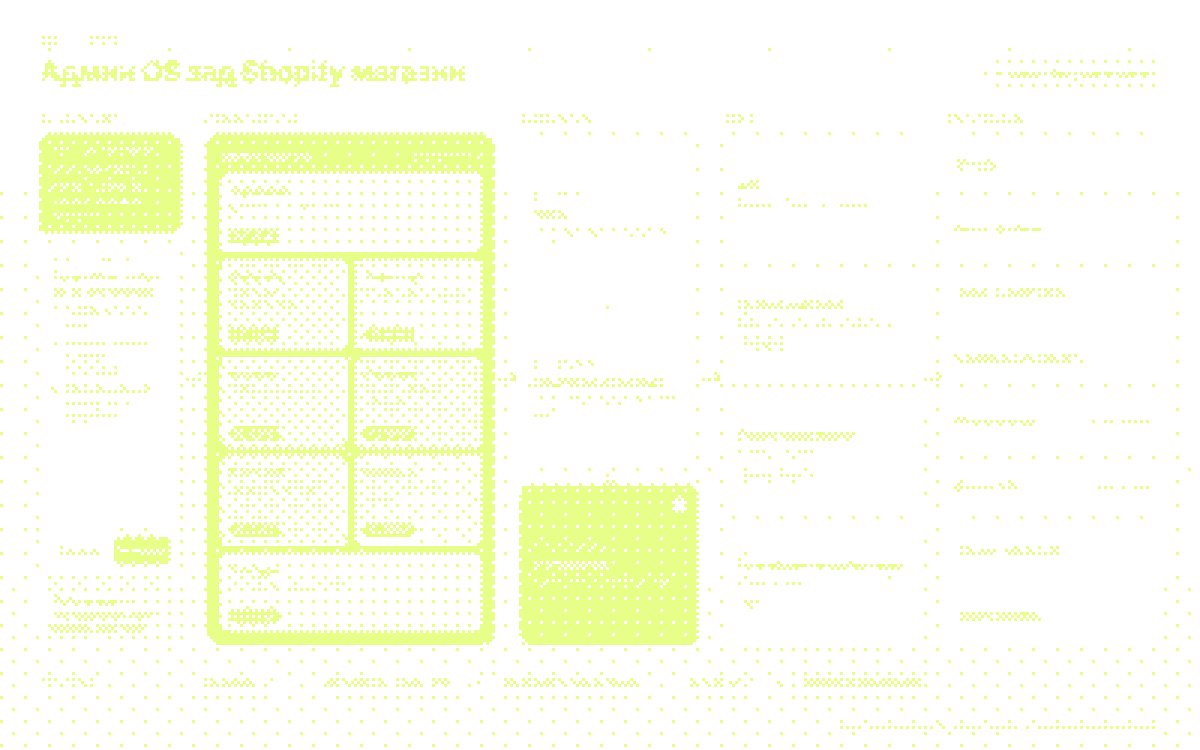
Cannapopolis OS: a schematic of the admin cockpit behind the Shopify store — 8 work areas and a three-step approval, no real data
FIG. 01 — Cannapopolis OS · E-commerce operations
Client
Cannapopolis
Industry
E-commerce operations
Status
Live
What we built
AI system · Web app · Online store
Stack
React · TypeScript · Node.js · Fastify · Shopify Admin API · n8n
Services
Process audit · AI agents & approval rules · Admin UX/UI · Full-stack engineering · Integrations · DevOps & testing

FIG. 02 — Anatomy

Brief

One chat in Bulgarian instead of Shopify, spreadsheets, courier portals and Gmail.

Cannapopolis OS: a schematic of the admin cockpit behind the Shopify store — 8 work areas and a three-step approval, no real data
A — Interface
The admin cockpit as a schematic: 8 work areas, each with an AI agent
B — Logic
Read → draft → execute only after a “yes”
C — Agents & knowledge
An AI agent per department; Shopify, couriers, Gmail, sheets

Approach

  1. 01Challenge

    The business was growing, but attention was scattered across Shopify, spreadsheets, courier portals, Gmail, Meta and chat threads. The owner needed one system to tell, in Bulgarian, what to do, and have it work out how: fast day to day, strict wherever customers, money or documents are involved.

  2. 02Approach

    We split the work into eight departments, each with its own AI agent, and one rule for all of them: read → prepare → execute only after confirmation. The rule lives in the code: every route has a risk class, and the model never writes directly to Shopify, the couriers or the bank.

  3. 03Result

    Daily work runs through one chat. From an order message to a courier label, from a production batch to the remaining stock and from a new B2B lead to a ready offer in Gmail, everything is prepared automatically and waits for a single “yes”. Google Sheets remains the main operational data store while the move to PostgreSQL continues in stages.

Highlights

  • 018 departments, each with its own AI agent in Bulgarian
  • 0244 outside actions, all confirmation-gated
  • 03In real use since April 2026
Skip the chapters ↓

How it’s built

CH. 01—05

Chapters

Cannapopolis OS is the internal command centre we built for the brand, behind its Shopify store. Each department has its own AI agent that reads live data from Shopify, the couriers, spreadsheets, Gmail and Meta and prepares the work; nothing goes out, whether a courier label, order, email, post or invoice, until the owner has seen the exact preview and confirmed it.

  1. 01An AI agent in every department, with a human in the loop
  2. 02One order, from a message to a courier label
  3. 03Shopify and your tools, with clear permissions
  4. 04The whole system in one schematic
  5. 05Moving fast without breaking the store

CH. 01 / 05 — AI agents by department

An AI agent in every department, with a human in the loop

The owner writes as if to a colleague. The agent reads the live data, prepares an exact preview and waits for confirmation before anything goes out.

Demo · schematic

Chat · Bulgarian

“How are we doing today?”

Owner

Manager

AI agent
  • Reads every department
  • Answers in 3–7 lines: the decision and the next step

Read-only

Read-only. Orders go through the Orders desk.

  • A short brief linking to each department

Tools

  • All departments

01 / 08 — Manager

Illustrative schematic. Orders, names, amounts and messages are examples.
  • 01/08Manager

    AI agent
    1. Input

      “How are we doing today?”

    2. AI agent

      • Reads every department
      • Answers in 3–7 lines: the decision and the next step
    3. Approval

      Read-only

      Read-only. Orders go through the Orders desk.

    4. Action

      • A short brief linking to each department
    5. Tools

      • All departments
  • 02/08Orders

    AI agent
    1. Input

      “Fulfil #1042 with Econt to an office in Burgas, cash on delivery.”

    2. AI agent

      • Checks the order in Shopify
      • Finds the nearest office or locker
      • Cash on delivery = the order total
    3. Approval

      Approved

      “Approve?” → “yes”

    4. Action

      • A courier label as a PDF
      • Order fulfilled in Shopify
      • Checked against the courier
    5. Tools

      • Shopify
      • Econt
      • BOX NOW
  • 03/08Inventory

    AI agent
    1. Input

      “We made 50 bottles of the 10% pet oil today.”

    2. AI agent

      • Recognises the product
      • Deducts the components by recipe
      • Shows the remaining capacity and the bottleneck
    3. Approval

      Approved

      “Confirm entry”

    4. Action

      • Component stock updated

      It never changes stock or prices in Shopify.

    5. Tools

      • Google Sheets
      • Shopify (read)
  • 04/08Content

    AI agent
    1. Input

      “Post: broad or full spectrum, what’s the difference?”

    2. AI agent

      • Copy, hashtags and a visual built on a real product photo
      • Wording checked against Meta’s rules
    3. Approval

      Approved

      Preview → “Publish”

    4. Action

      • A post on Facebook and Instagram
    5. Tools

      • Meta
      • AI for text and images
  • 05/08Ads

    AI agent
    1. Input

      “How are the ads doing this week?”

    2. AI agent

      • A daily read-only sync with Meta
      • What I see → what I propose → what I did NOT change
    3. Approval

      Read-only

      Read-only: no access to budgets or campaigns

    4. Action

      • An internal proposal and a content task
    5. Tools

      • Meta (read)
  • 06/08B2B CRM

    AI agent
    1. Input

      “Find organic shops in Stara Zagora.”

    2. AI agent

      • Searches OpenStreetMap by city and type
      • Scores leads and drops existing clients
      • An offer as a Gmail draft with the documents
    3. Approval

      Typed confirmation

      Sends only after a typed confirmation

    4. Action

      • Offer sent
      • A 3-step follow-up
    5. Tools

      • OpenStreetMap
      • Gmail
      • Google Drive
  • 07/08Finance

    AI agent
    1. Input

      “Has Demo Ltd paid?”

    2. AI agent

      • Checks bank transactions, read-only
      • Answers with a “candidate match”, never a guess
      • Prepares the accountant’s monthly pack
    3. Approval

      Read-only

      The bank connection is read-only, by design

    4. Action

      • A monthly checklist: what’s ready, what’s missing
    5. Tools

      • Bank (read)
      • Google Drive
  • 08/08Invoices

    AI agent
    1. Input

      “Invoice Demo Ltd: 3 × 5%.”

    2. AI agent

      • Legal details from the B2B profile
      • 20% VAT, totals in EUR and BGN
      • A PDF preview watermarked “PREVIEW”
    3. Approval

      Approved

      You set the number; sending is a separate step

    4. Action

      • A PDF and a Gmail draft
    5. Tools

      • Google Sheets
      • Gmail
Illustrative schematic. Orders, names, amounts and messages are examples.

01/08Manager

AI agent
  1. Input

    “How are we doing today?”

  2. AI agent

    • Reads every department
    • Answers in 3–7 lines: the decision and the next step
  3. Approval

    Read-only

    Read-only. Orders go through the Orders desk.

  4. Action

    • A short brief linking to each department
  5. Tools

    • All departments

02/08Orders

AI agent
  1. Input

    “Fulfil #1042 with Econt to an office in Burgas, cash on delivery.”

  2. AI agent

    • Checks the order in Shopify
    • Finds the nearest office or locker
    • Cash on delivery = the order total
  3. Approval

    Approved

    “Approve?” → “yes”

  4. Action

    • A courier label as a PDF
    • Order fulfilled in Shopify
    • Checked against the courier
  5. Tools

    • Shopify
    • Econt
    • BOX NOW

03/08Inventory

AI agent
  1. Input

    “We made 50 bottles of the 10% pet oil today.”

  2. AI agent

    • Recognises the product
    • Deducts the components by recipe
    • Shows the remaining capacity and the bottleneck
  3. Approval

    Approved

    “Confirm entry”

  4. Action

    • Component stock updated

    It never changes stock or prices in Shopify.

  5. Tools

    • Google Sheets
    • Shopify (read)

04/08Content

AI agent
  1. Input

    “Post: broad or full spectrum, what’s the difference?”

  2. AI agent

    • Copy, hashtags and a visual built on a real product photo
    • Wording checked against Meta’s rules
  3. Approval

    Approved

    Preview → “Publish”

  4. Action

    • A post on Facebook and Instagram
  5. Tools

    • Meta
    • AI for text and images

05/08Ads

AI agent
  1. Input

    “How are the ads doing this week?”

  2. AI agent

    • A daily read-only sync with Meta
    • What I see → what I propose → what I did NOT change
  3. Approval

    Read-only

    Read-only: no access to budgets or campaigns

  4. Action

    • An internal proposal and a content task
  5. Tools

    • Meta (read)

06/08B2B CRM

AI agent
  1. Input

    “Find organic shops in Stara Zagora.”

  2. AI agent

    • Searches OpenStreetMap by city and type
    • Scores leads and drops existing clients
    • An offer as a Gmail draft with the documents
  3. Approval

    Typed confirmation

    Sends only after a typed confirmation

  4. Action

    • Offer sent
    • A 3-step follow-up
  5. Tools

    • OpenStreetMap
    • Gmail
    • Google Drive

07/08Finance

AI agent
  1. Input

    “Has Demo Ltd paid?”

  2. AI agent

    • Checks bank transactions, read-only
    • Answers with a “candidate match”, never a guess
    • Prepares the accountant’s monthly pack
  3. Approval

    Read-only

    The bank connection is read-only, by design

  4. Action

    • A monthly checklist: what’s ready, what’s missing
  5. Tools

    • Bank (read)
    • Google Drive

08/08Invoices

AI agent
  1. Input

    “Invoice Demo Ltd: 3 × 5%.”

  2. AI agent

    • Legal details from the B2B profile
    • 20% VAT, totals in EUR and BGN
    • A PDF preview watermarked “PREVIEW”
  3. Approval

    Approved

    You set the number; sending is a separate step

  4. Action

    • A PDF and a Gmail draft
  5. Tools

    • Google Sheets
    • Gmail
Illustrative schematic. Orders, names, amounts and messages are examples.

CH. 02 / 05 — Lead scenario

One order, from a message to a courier label

One message, one order, fulfilled once. The agent checks, chooses and calculates; the owner only says “yes”.

Demo · schematic

The owner writes

Short, in Bulgarian, typos included: the agent understands and starts checking.

What the system does

  • Understands short Bulgarian text
  • One order = one fulfilment run
  1. Fulfil #1042 with Econt to an office in Burgas, cash on delivery.

  2. AI

    Checking the order in Shopify and Econt’s offices in Burgas…

Illustrative schematic. Orders, names, amounts and messages are examples.
  1. 01 / 04 — Message

    The owner writes

    Short, in Bulgarian, typos included: the agent understands and starts checking.

    What the system does

    • Understands short Bulgarian text
    • One order = one fulfilment run
    1. Fulfil #1042 with Econt to an office in Burgas, cash on delivery.

    2. AI

      Checking the order in Shopify and Econt’s offices in Burgas…

  2. 02 / 04 — Proposal

    One exact preview

    The agent reads the order in Shopify without changing it, picks the nearest office and applies the rules before approval: cash on delivery equals the total.

    What the system does

    • Shopify: read-only
    • Offices sorted by measured distance
    • Cash on delivery = the order total

    Fulfilment proposal

    Demo data

    Demo · schematic
    Shopify order
    #1042 · unfulfilled
    Courier
    Econt · to an office
    Office
    Burgas – Demo Centre · 0.6 km
    Cash on delivery
    €48.60 = total
    Weight
    0.2 kg (2 × 0.100)
    Customer notification
    off
    Approve?
  3. 03 / 04 — “yes”

    One “yes”

    A “yes” approves only the version shown. Any correction needs a new approval.

    What the system does

    • Approves the exact version
    • “Stop” cancels an unconfirmed proposal
    1. Fulfil #1042 with Econt to an office in Burgas, cash on delivery.

    2. AI

      Proposal: Econt to the Burgas – Demo Centre office (0.6 km), cash on delivery €48.60. Approve?

    3. yes

    4. AI

      Done: a courier label as a PDF, the order fulfilled in Shopify and checked against Econt.

  4. 04 / 04 — Done

    Label and reconciliation

    It runs once, with no duplicate parcels. “Done” comes only after checking Shopify and the courier.

    What the system does

    • A courier-label PDF in the chat
    • Checked against Shopify and the courier

    Done

    Demo data

    Demo · schematic
    Courier label
    created
    Shopify
    order fulfilled
    Reconciliation
    Econt and Shopify match
    PDF
    label-demo.pdf
    Checked
Illustrative schematic. Orders, names, amounts and messages are examples.
  1. 01 / 04 — Message

    The owner writes

    Short, in Bulgarian, typos included: the agent understands and starts checking.

    What the system does

    • Understands short Bulgarian text
    • One order = one fulfilment run
    1. Fulfil #1042 with Econt to an office in Burgas, cash on delivery.

    2. AI

      Checking the order in Shopify and Econt’s offices in Burgas…

  2. 02 / 04 — Proposal

    One exact preview

    The agent reads the order in Shopify without changing it, picks the nearest office and applies the rules before approval: cash on delivery equals the total.

    What the system does

    • Shopify: read-only
    • Offices sorted by measured distance
    • Cash on delivery = the order total

    Fulfilment proposal

    Demo data

    Demo · schematic
    Shopify order
    #1042 · unfulfilled
    Courier
    Econt · to an office
    Office
    Burgas – Demo Centre · 0.6 km
    Cash on delivery
    €48.60 = total
    Weight
    0.2 kg (2 × 0.100)
    Customer notification
    off
    Approve?
  3. 03 / 04 — “yes”

    One “yes”

    A “yes” approves only the version shown. Any correction needs a new approval.

    What the system does

    • Approves the exact version
    • “Stop” cancels an unconfirmed proposal
    1. Fulfil #1042 with Econt to an office in Burgas, cash on delivery.

    2. AI

      Proposal: Econt to the Burgas – Demo Centre office (0.6 km), cash on delivery €48.60. Approve?

    3. yes

    4. AI

      Done: a courier label as a PDF, the order fulfilled in Shopify and checked against Econt.

  4. 04 / 04 — Done

    Label and reconciliation

    It runs once, with no duplicate parcels. “Done” comes only after checking Shopify and the courier.

    What the system does

    • A courier-label PDF in the chat
    • Checked against Shopify and the courier

    Done

    Demo data

    Demo · schematic
    Courier label
    created
    Shopify
    order fulfilled
    Reconciliation
    Econt and Shopify match
    PDF
    label-demo.pdf
    Checked
Illustrative schematic. Orders, names, amounts and messages are examples.

CH. 03 / 05 — Integrations & permissions

Shopify and your tools, with clear permissions

Shopify automation without surprises: every connection has a risk class in the code. The model reads and proposes, but never writes directly to Shopify, the couriers or the bank.

Demo · schematic
  • 122 routes with a risk class
  • 44 outside actions
  • all confirmation-gated

Cannapopolis OS

admin cockpit · 8 agents · data in Google Sheets

Shopifywrites after a “yes”
Econt · BOX NOWwrites after a “yes”
Gmailsends after confirmation
Facebook · Instagramsends after confirmation
Meta Adsreads only
Bankreads only
OpenStreetMapreads only
n8n · syncsreads only

01 / 03 — reads only

Illustrative schematic. Orders, names, amounts and messages are examples.

Cannapopolis OS

admin cockpit · 8 agents · data in Google Sheets

Shopifywrites after a “yes”
Econt · BOX NOWwrites after a “yes”
Gmailsends after confirmation
Facebook · Instagramsends after confirmation
Meta Adsreads only
Bankreads only
OpenStreetMapreads only
n8n · syncsreads only

Reads

Live data with nothing changed: ads, bank transactions, maps and scheduled syncs.

  • Meta Adsreads only
  • Bankreads only
  • OpenStreetMapreads only
  • n8n · syncsreads only

Prepares, then executes after a “yes”

Courier labels and Shopify orders, only after the exact version is confirmed.

  • Shopifywrites after a “yes”
  • Econt · BOX NOWwrites after a “yes”

Sends after an explicit confirmation

Emails and posts go out only after a preview and a separate confirmation.

  • Gmailsends after confirmation
  • Facebook · Instagramsends after confirmation
  • 122 routes with a risk class
  • 44 outside actions
  • all confirmation-gated
Illustrative schematic. Orders, names, amounts and messages are examples.

Cannapopolis OS

admin cockpit · 8 agents · data in Google Sheets

Reads

Live data with nothing changed: ads, bank transactions, maps and scheduled syncs.

  • Meta Adsreads only
  • Bankreads only
  • OpenStreetMapreads only
  • n8n · syncsreads only

Prepares, then executes after a “yes”

Courier labels and Shopify orders, only after the exact version is confirmed.

  • Shopifywrites after a “yes”
  • Econt · BOX NOWwrites after a “yes”

Sends after an explicit confirmation

Emails and posts go out only after a preview and a separate confirmation.

  • Gmailsends after confirmation
  • Facebook · Instagramsends after confirmation
  • 122 routes with a risk class
  • 44 outside actions
  • all confirmation-gated
Illustrative schematic. Orders, names, amounts and messages are examples.

CH. 04 / 05 — Architecture

The whole system in one schematic

From a Bulgarian chat to the integrations and new releases with automatic rollback. The schematic is illustrative: labels and the order number are examples.

Demo · schematic

Route

PL. 01 — The whole schematic: from the chat to the integrations and releases

Illustrative schematic. Orders, names, amounts and messages are examples.

Route

  1. 01The whole schematic: from the chat to the integrations and releases
  2. 02The owner writes in the chat; the admin cockpit has 8 work areas, each with an AI agent
  3. 03Approval: read → draft → execute; the core, with durable actions; the integrations
  4. 04Release: verify → artifact → switch → smoke check → auto-rollback
Open the full image (opens in a new tab)
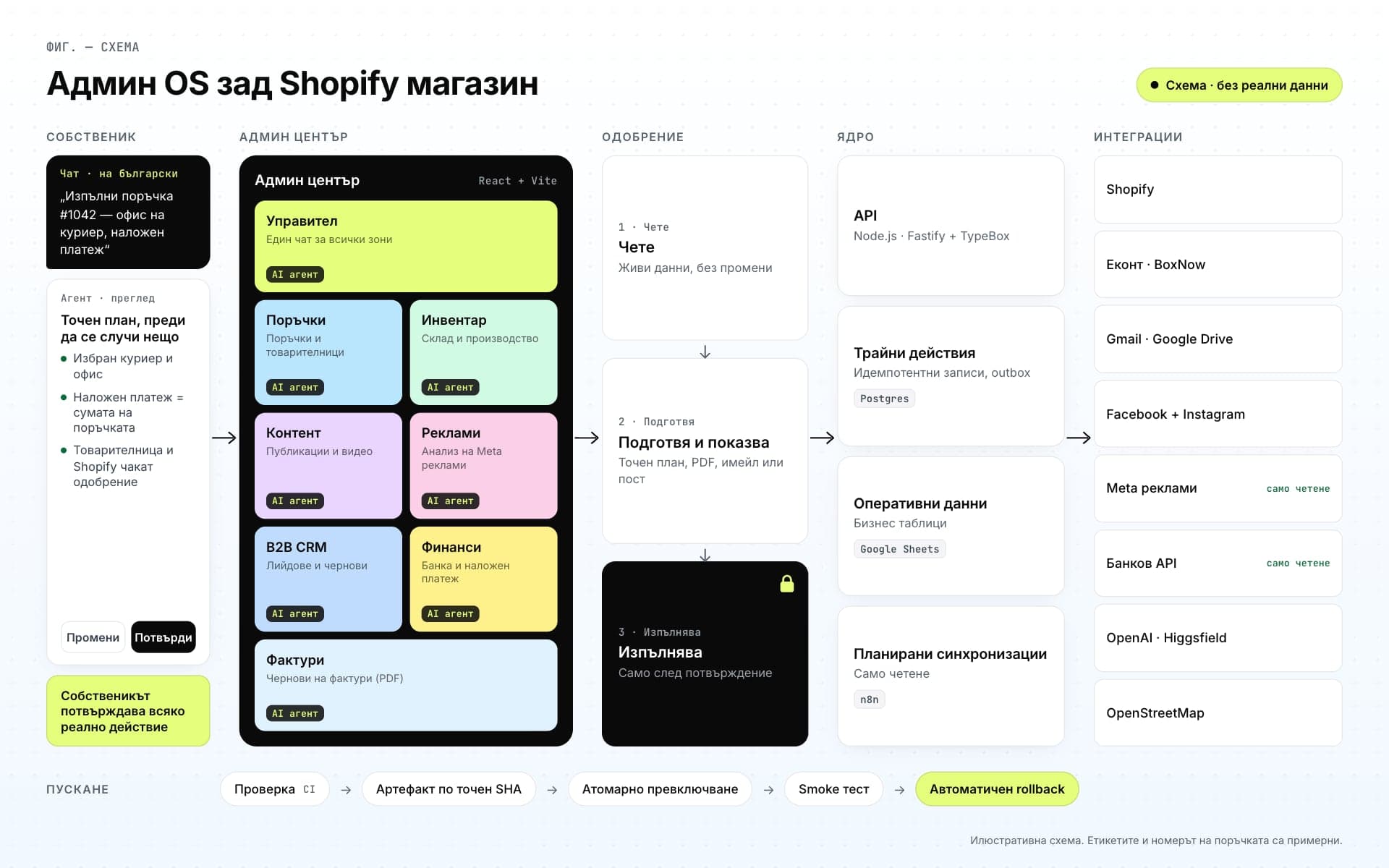
OS schematic (English): an owner request in Bulgarian chat, eight AI work areas in the admin cockpit, the read → draft → execute approval gate, the core (typed API, durable actions, Google Sheets as operational data, scheduled read-only syncs) and the integrations; the release pipeline with auto-rollback runs along the bottom. Placeholder data only.
Illustrative schematic. Orders, names, amounts and messages are examples.
OS schematic (English): an owner request in Bulgarian chat, eight AI work areas in the admin cockpit, the read → draft → execute approval gate, the core (typed API, durable actions, Google Sheets as operational data, scheduled read-only syncs) and the integrations; the release pipeline with auto-rollback runs along the bottom. Placeholder data only.
Illustrative schematic. Orders, names, amounts and messages are examples.

Route

  1. 01The whole schematic: from the chat to the integrations and releases
  2. 02The owner writes in the chat; the admin cockpit has 8 work areas, each with an AI agent
  3. 03Approval: read → draft → execute; the core, with durable actions; the integrations
  4. 04Release: verify → artifact → switch → smoke check → auto-rollback
Open the full image (opens in a new tab)

CH. 05 / 05 — Engineering

Moving fast without breaking the store

The system has been in real use since April 2026. Every release is verified, shipped from an exact commit and rolled back automatically if something goes wrong.

  1. First real courier label from chat
  2. Engineering audit
  3. The new interface takes over
  4. Orders by chat, with approval
  • 8

    departments, each with an AI agent

  • 122

    routes, each with a risk class

  • 44

    outside actions, all confirmation-gated

  • 724

    test files

  • 48

    Bulgarian test scenarios for orders

  • 1,952

    commits in under five months

  • Google Sheets remains the main operational data store; the move to PostgreSQL is happening in stages.
  • Technical facts as of 26 Sep 2026. No business figures.

Palette & type

  • #1D2420Graphite
  • #2D6F4CGreen
  • #F5F6F2Paper
  • #8C5F12Amber
  • #5D587FViolet
  • Inter

Contact

Want something like this?

Your project could be Fig. 07.

30 minutes, no commitment. You’ll leave with concrete ideas for your website, processes or product.

FIG. 07 — Your project30 minutes · no commitment · we reply within a few hours on business days